6 posts tagged with "exchange"

View All Tags

· 5 min read
Robert Thomas

Recently I've been building an SPFx app that allows a user to see what groups they manage and allow them to bulk update the membership via CSV. One of the first hurdles was to get all the groups the user is an owner/manager of. This needed to work with all group types:

  • Office 365
  • Distribution *
  • Mail-enabled security *
  • Security

· 5 min read
Robert Thomas

Whether it be a large group or one that has restricted users, you may need to limit who can send to these mail enabled security groups. In addition, you may even want to enable moderation to allow specific users to approve/deny messages from reaching the members.

The good news is that all this can be done by using AD and Exchange to enable group moderation.

· One min read
Robert Thomas

Recently I needed to get a bunch of groups from Exchange by their ExternalDirectoryObjectId property. There are many ways to do this and one of the easiest would be to just get the Name (or other unique identifier) by looking up the group in AAD via MSOL PS. However, you can use the -Filter parameter for Get-DistributionGroup cmdlet and specify the id:

Get-DistributionGroup -Filter { ExternalDirectoryObjectId -eq $group.ExternalDirectoryObjectId }

· One min read
Robert Thomas

I was working from home today and was trying to connect to Exchange Online via PowerShell. However, every time I tried to connect I would get the following error:

System.Xml.XmlException: For security reasons DTD is prohibited in this XML document. To enable DTD processing set the DtdProcessing property on XmlReaderSettings to Parse and pass the settings into XmlReader.Create method.

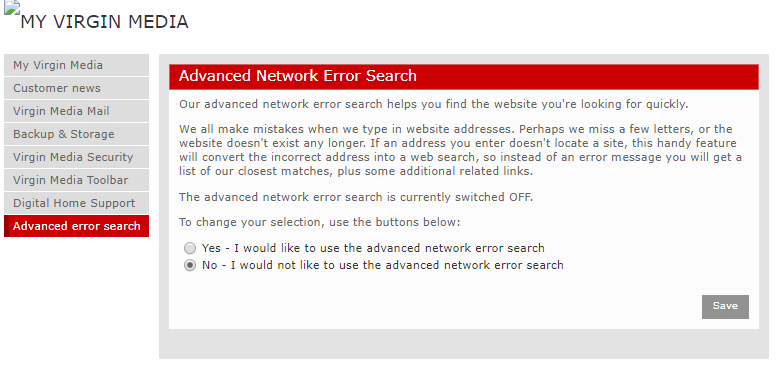
It was working fine in a RD session in the office but not at home. After a quick Google I saw a few other posts with people mentioning that it could be to do with your ISP. Some have a 'feature' called Advanced Network Error Search that will present a custom search page if a domain name cannot be resolved. That may be useful for some people but it turns out that was the culprit.

My ISP is Virgin Media and all I had to do was go here and change my selection to No - I would not like to use the advanced network error search. After a quick reboot of my modem everything was working!